Skip to content
Confusing, overcomplicated engineering drawings stall production and burn budgets. Here’s how to fix that.
Clear, well-structured engineering drawings speed up quoting, reduce errors, and save money throughout the product lifecycle — from design review to final QC inspection.
Let’s break down 10 practical, engineering-tested ways to improve your technical drawings for manufacturability and cost-efficiency.
Use Standard Views and Layouts: Why Does It Matter in Engineering Drawings?
Unclear visuals confuse fabricators, delay quoting, and invite errors. Standardized drawing views create shared understanding between designers and manufacturers.
Using orthographic views with isometric perspectives ensures drawings are quickly understood and correctly interpreted — no need for assumptions or clarifications.
Let’s dive deeper into why view consistency directly improves design quality and manufacturing efficiency.
What Are Standard Views in Engineering Drawings?
Standard views refer to the internationally accepted set of drawing perspectives — typically based on ISO (European) or ANSI (American) conventions. These include:
- Top View – shows the part from above
- Front View – main orientation of the part
- Side View – reveals the depth and profile
- Isometric View – offers a 3D perspective
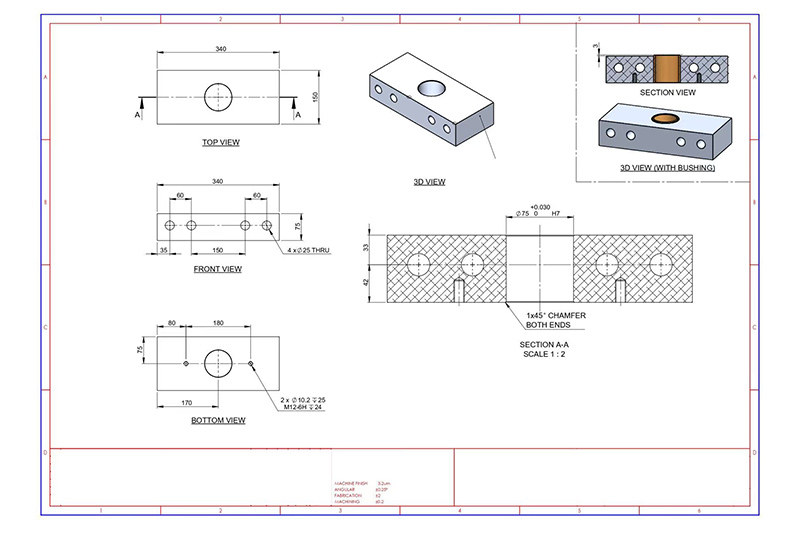
Why These Views Are Standardized
Using a predictable layout helps all downstream stakeholders — including CNC programmers, toolmakers, and QA inspectors — visualize geometry without needing to mentally rotate or guess dimensions.
Benefits of Using Standard Views
| Benefit | Why It Matters |
|---|---|
| Improved Clarity | Minimizes misinterpretation of part geometry |
| Faster Quoting | Suppliers can assess machining difficulty more quickly |
| Easier CAM Programming | Standard views directly support G-code generation |
| Streamlined QA | Inspectors match 2D to 3D for quality verification |
How I Apply This in My Own Work
Every time I prep a drawing for CNC quote or DFM review, I start by aligning the part orientation with its functional use. Then, I always include the “Big Three” views (top, front, side) in the layout and supplement with an isometric if the shape is complex.
Best Practices Checklist
- Use consistent projection standards (first-angle for ISO, third-angle for ANSI)
- Position views logically: Front → Top → Side, left to right
- Add isometric for parts with internal or compound geometry
- Avoid excessive auxiliary or sectional views unless critical
Remember, a machinist only needs one wrong assumption to scrap an entire part run. Give them a layout that’s impossible to misread.
Conclusion
Standard views and layouts are more than tradition — they’re a best practice that reduces confusion, shortens lead times, and ensures your intent is clearly communicated. Start with strong visual structure, and your whole workflow benefits.
Avoid Overdimensioning: How Much Is Too Much in Engineering Drawings?
Too many dimensions create clutter, confusion, and unnecessary cost. Smart dimensioning focuses only on what’s functionally essential.

Overdimensioning inflates machining and inspection time. Limit your dimensions to what’s required for manufacturing, and let CAD models do the rest.
Here’s why strategic dimensioning isn’t just good practice — it’s critical for time, cost, and clarity.
What Is Overdimensioning and Why Does It Hurt?
Overdimensioning happens when a drawing includes more dimensions than necessary — often duplicating details already defined by 3D models. It typically shows up as:
- Redundant linear or hole locations
- Repeating diameters or thread specs
- Overly tight tolerances on non-functional surfaces
Impacts of Overdimensioning
| Problem | Effect |
|---|---|
| Drawing Clutter | Harder for machinists and QA teams to interpret the key features |
| Slower Quoting | Suppliers waste time checking unnecessary callouts |
| Increased Costs | Inspectors must check all dimensions, including non-critical ones |
| Higher Rejection Risk | Parts may be flagged for non-functional deviations |
How I Handle This in My Own Work
Whenever I prepare an engineering drawing, I isolate what matters most: critical-to-function (CTF) dimensions. These are the features affecting fit, form, and performance. Everything else? I reference the CAD file or apply general tolerances from ISO 2768 or ASME Y14.5 to reduce visual overload.
Tips to Avoid Overdimensioning
- Use baseline or ordinate dimensioning schemes
- Reference the 3D model for nominal values
- Rely on general tolerance blocks for non-critical features
- Group dimensions by function (e.g., mounting holes, interface points)
- Avoid dimensioning across multiple views unless necessary
Pro Insight
In one of my early projects, I included every single hole diameter and centerline offset on the drawing, even though the CAD was attached. The manufacturer ended up calling twice to clarify conflicting callouts — a completely avoidable delay if I had trusted the model and kept the drawing lean.
Conclusion
Avoiding overdimensioning isn’t about leaving things out — it’s about trusting your design tools and knowing what actually needs inspection. Smart dimensioning saves everyone time, reduces risk, and communicates more clearly.
Apply GD&T Thoughtfully: How to Balance Precision and Practicality?
GD&T ensures fit and function — but when misused, it leads to confusion, cost, and part rejection.

Strategically applying GD&T (Geometric Dimensioning and Tolerancing) aligns design intent with manufacturability, especially for critical assemblies.
When I apply GD&T thoughtfully, I reduce ambiguity, control cost, and make life easier for everyone down the line — from CNC programmer to quality inspector.
What Is GD&T and Why Should It Be Used Strategically?
GD&T is a symbolic language used on engineering drawings to precisely define allowable variation in form, orientation, profile, and position. While powerful, improper or excessive use of GD&T adds complexity and raises manufacturing costs without improving performance.
Why Overusing GD&T Hurts Your Project
| Misuse | Problem | Impact |
|---|---|---|
| Unnecessary tight tolerances | Machining beyond capability or reason | Higher costs, more rework |
| Misapplied datums | Features controlled from irrelevant surfaces | Inspection issues, incorrect measurements |
| GD&T on non-critical features | Increased complexity | More QC effort, slowed delivery |
My Personal Approach to GD&T
For functional assemblies, I use position and flatness controls where exact mating or movement occurs. I avoid profile or concentricity unless there’s a functional or regulatory reason. My rule of thumb? If a micrometer wouldn’t catch it, maybe it doesn’t need GD&T at all.
When and Where to Use GD&T
- Critical fit features (e.g., shaft-hole assemblies)
- Functional interfaces (e.g., gasket surfaces, sliding fits)
- High-speed rotating parts (use concentricity or position)
- Regulatory-required controls (especially in aerospace/medical)
Tips to Use GD&T Wisely
- Start with a clear datum strategy — keep it functional
- Use tolerance stacks to justify controls
- Collaborate with your manufacturer for feedback on feasibility
- Document intent with notes or separate design memos if needed
Real-World Example
I once inherited a drawing with ±0.01 mm tolerance across 12 hole positions — it caused multiple rejections and vendor complaints. By converting to true position tolerance with MMC (Maximum Material Condition), we not only reduced scrap but also simplified inspection using a functional gage. That’s when I really understood the power of thoughtful GD&T.
Conclusion
GD&T is a precision tool, not a checklist. Use it intentionally, focusing only on what affects form, fit, and function. Less guesswork, better parts, lower cost — everyone wins.
Include a Comprehensive Title Block: Why Is It More Than Just a Formality?
Missing or vague title blocks lead to production delays and unnecessary back-and-forth emails.
A complete, standardized title block acts as the project’s control panel — capturing essential details like part ID, material, revision level, and tolerances at a glance.

In my experience, investing time upfront in the title block saves days during procurement, quoting, and shop floor execution.
What Belongs in a Proper Engineering Title Block?
Your title block should act as the universal translator between design, production, and quality assurance. Every stakeholder — from machinist to supplier — should be able to find what they need at a glance. Here’s what I always include:
Minimum Required Fields
| Field | Purpose |
|---|---|
| Part Name and Number | Clear identification across systems and vendors |
| Revision Level | Avoids working off outdated drawings |
| Drawing Scale | Accurate visual inspection and understanding |
| Material Specification | Ensures correct stock and machinability |
| Finish/Treatment | Specifies anodizing, plating, or coatings |
| General Tolerances | Governs unspecified features (e.g., ISO 2768-mK) |
| Drawn / Checked By | Accountability and traceability |
| Approval / Sign-Offs | Documented internal or client validation |
Why a Title Block Matters More Than You Think
- Prevents incorrect material or finish being used
- Guides CNC programmers on tolerance zones
- Enables compliance with ISO, ASME, or MIL specs
- Links drawing to ERP systems or purchase orders
How I Standardize Title Blocks in Practice
At my company, we use CAD templates with pre-filled fields. This reduces errors, speeds up RFQ reviews, and makes onboarding easier for new engineers. We also include QR codes on title blocks that link to revision histories — no more guesswork.
Common Mistakes to Avoid
- Omitting material or finish info — leads to wrong procurement
- Using outdated revision labels (e.g., Rev “A” reused)
- Leaving tolerances blank — suppliers assume worst-case
Conclusion
Think of the title block as your drawing’s executive summary — short, structured, and packed with meaning. Done well, it prevents errors, speeds decisions, and communicates professionalism to everyone who sees your drawing.
Use Clear and Concise Notes: Why Do Small Words Save Big Time?
Vague notes on technical drawings lead to slowdowns, supplier questions, and costly rework.
Concise, specific notes eliminate ambiguity, reduce back-and-forth, and ensure that manufacturers know exactly what’s expected — without guessing.

In my workflow, properly written notes can make the difference between a one-week turnaround and a two-week delay.
What Makes a Good Engineering Note?
Every note should provide just enough instruction to clarify intent — not more, not less. Here’s my checklist for effective drawing notes:
Use Actionable Language
- Good: “Deburr all edges to R0.3 max.”
- Bad: “Deburr as required.”
The former gives a measurable standard; the latter invites interpretation and inconsistency.
Be Specific About Standards
- Good: “Apply anodize per MIL-A-8625 Type II, Class 2, black.”
- Bad: “Apply black anodize.”
When I include standard references, suppliers know exactly what regulatory or performance criteria to follow.
Include Depths and Threads Precisely
- Good: “Tap M6 × 1.0 – 6H to 10 mm depth.”
- Bad: “Thread M6 holes.”
Without depth, your part could be tapped through or not deep enough to function properly.
Reference Drawing Views or Features
- Example: “Apply bead blast finish to surfaces A and B only.”
This avoids the common mistake of finishing unintended surfaces — like sealing faces or tight-tolerance features.
Common Pitfalls in Drawing Notes
- Using “TBD” or “per customer discretion” — causes manufacturing delays
- Leaving out unit systems (mm vs in) — increases risk of dimensional errors
- Using notes that duplicate dimensions or callouts — clutters communication
How I Standardize Notes Across Drawings
At Onlyindustries, we use a master template of pre-approved notes tailored to surface finishes, heat treatments, and inspection standards. This keeps our supplier communication consistent and reduces errors across thousands of parts.
Sample Standard Note Bank (Partial)
| Note Type | Example |
|---|---|
| Finish | “Powder coat per RAL 9005, gloss, 80–120 μm.” |
| Thread | “All threaded holes to be tapped M8 × 1.25 – 6H to 15 mm depth.” |
| Deburring | “Break all sharp edges to R0.3 max unless otherwise specified.” |
| Inspection | “Critical dimensions marked with ▲ are 100% inspected.” |
Conclusion
When I write drawing notes, I ask: could this be misread or misinterpreted in a different factory, language, or shift? Clear notes reduce risk, speed production, and communicate trust — all while making your drawing a better manufacturing document.
Limit the Number of Revisions: How Can Fewer Changes Boost Production?
Each revision to a drawing costs time, causes confusion, and disrupts workflow — especially in production environments where consistency is critical.
Limiting revisions on engineering drawings reduces tooling delays, miscommunication, and administrative overhead. It ensures suppliers build to a stable, validated design.
I’ve learned the hard way that unnecessary revisions often lead to costly mistakes, especially when old versions linger on shared drives or shop floors.
Why Excessive Revisions Are a Problem
Every time you update a drawing — even a minor tweak — it triggers downstream ripple effects:
- New RFQ cycles and updated cost estimates
- Tooling rework or fixture adjustments
- Revised quality plans and inspection criteria
- Higher risk of parts being made to outdated versions
This complexity compounds across high-volume orders, multi-part assemblies, or global supply chains.
Best Practices to Minimize Revisions
Run a DFM Check Before Final Release
Partner with your CNC supplier or manufacturing engineer to verify manufacturability before you send out drawings for production.
- Check for non-standard tolerances
- Eliminate deep, narrow pockets or undercuts
- Use standard thread depths and radii
Validate Designs with Prototypes
Always pilot your drawing with a small test batch — even just one part — to confirm form, fit, and function before pushing to mass production.

Use Clear Revision Control Protocols
| Element | Best Practice |
|---|---|
| Title Block | Include revision level and date |
| Revision Table | Log changes clearly with initials and purpose |
| File Naming | Use versioned names (e.g., “Bracket_v3.pdf”) |
Don’t Use Production Runs for Testing
It’s tempting to fix a tolerance mid-way through production or tweak a slot width without validation. But those in-process edits often create legacy confusion or undocumented features — making reorders unpredictable.
My Process: When to Release vs. Revise
At Onlyindustries, we use a two-stage review system:
- Stage 1: Pre-release prototype with REV A tag and internal-only notes.
- Stage 2: Final release after testing — promoted to REV B or REV 1 with full QA checklist.
This allows us to explore ideas during R&D without polluting the production workflow with half-baked concepts.
When a Revision Is Justified
Not all revisions are bad — but they should be strategic. Good reasons include:
- Design change to meet new functional requirements
- Tolerance tightening after field testing or customer feedback
- Material substitution due to supply chain shifts
Just be sure you retire the old version formally and re-qualify affected downstream steps.
Conclusion
Limiting revisions keeps your manufacturing process lean, consistent, and predictable. The fewer design shifts you make after release, the faster and cheaper your parts get delivered — exactly as you intended.
Specify Surface Finish Only Where Necessary: How Can It Save Time and Cost?
Unnecessary surface finish requirements drive up cost and complexity. If it doesn’t affect function or appearance, it probably doesn’t need to be there.
Limiting surface finish specs to critical areas reduces machining time, inspection effort, and post-processing — saving you both time and budget.
I’ve seen projects nearly double in price simply because Ra values were over-specified — often without functional justification.
What Happens When You Over-Specify Finishes?
Let’s say you apply Ra 0.8 μm (a fine finish) across the entire part — not just sealing faces or cosmetic panels. This decision can trigger:
- Extended CNC cycle times (slow feed rates, multiple passes)
- More expensive tooling (carbide inserts, polishing abrasives)
- Detailed surface metrology inspections (profilometers, QC reports)
The result? Higher part cost, longer lead times, and complex QA paperwork — for zero added value if the finish isn’t functionally relevant.
Where Surface Finish Actually Matters
Sealing or Gasket Interfaces
Poor surface texture can prevent proper sealing, especially with elastomer gaskets or O-rings. For these zones, Ra 0.8–1.6 μm is often essential.
Visual or Touch-Sensitive Surfaces
Exterior-facing surfaces on consumer electronics or aerospace panels may require matte blasting, brushing, or anodizing prep to ensure uniform appearance.
Sanitary or Medical Parts
Food-grade or surgical parts must meet electropolished or ground finishes to prevent bacterial entrapment.
Mating and Sliding Features
Too rough? Excessive friction. Too smooth? Poor lubrication retention. Proper Ra spec (usually 0.8–3.2 μm) ensures optimal function.
Industry-Standard Surface Roughness Guidelines
| Application | Recommended Ra | Notes |
|---|---|---|
| General Machining | 3.2–6.3 μm | Default finish unless otherwise specified |
| Sealing Surfaces | 0.8–1.6 μm | O-rings, flat gaskets, valves |
| Bearings / Shafts | 0.2–0.8 μm | Low friction, high wear-resistance |
| Cosmetic Panels | 1.6–3.2 μm | Blasted, brushed, or pre-anodized |
My Recommendation
On my drawings, I follow this rule: if the surface finish impacts functionality or the customer’s perception — specify it. Otherwise, let the machinist decide. Most modern CNC setups already deliver a decent finish (~3.2 μm Ra) without extra effort.
Also, use drawing notes or flags to localize your finish requirements:
- “Ra 1.6 max on shaded areas only”
- “Finish callouts apply to seal faces only”
This helps avoid misinterpretation while still keeping critical features controlled.

Conclusion
Every finish requirement should earn its place on your drawing. By specifying surface roughness only where needed, you streamline manufacturing, reduce costs, and focus inspection efforts where they count.
Use Drawing Templates and CAD Standards: Why Is This Essential for Consistency and Speed?
Manual drawings are prone to inconsistencies and errors. Without a template or standardized CAD setup, your team spends more time formatting than engineering.
Using drawing templates and CAD standards ensures consistency, saves hours of admin work, and keeps everyone — from design to production — aligned.

I’ve seen teams cut drawing prep time by 30% just by implementing a proper CAD template — and dramatically reduce RFQ rejections from suppliers.
What Should a Good Drawing Template Include?
A professional engineering drawing template serves as a repeatable framework, with all the essentials pre-loaded and ready to go:
- Title Block: Company logo, material field, finish callout, date, revision history
- Default Views: Top, front, right-side orthographic views, plus an isometric if needed
- Tolerance Block: According to ISO 2768-mK or ASME Y14.5 default standards
- Standard Notes: e.g., “Deburr all edges,” “Do not scale drawing,” or general finish instructions
- Revision Control: Drawing version and change log section
Benefits of Standardized CAD Practices
Faster Documentation
With pre-set dimensions, annotations, and symbols, engineers don’t need to manually format or insert every detail from scratch. This can save up to 1–2 hours per drawing — especially during peak development cycles.
Cross-Team Uniformity
Templates enforce naming conventions, metadata fields, and layer structures that unify work across engineering, QA, and manufacturing teams. It’s much easier to review and audit standardized documents.
Faster Supplier Turnaround
When vendors receive consistent, clearly structured drawings, they can quote faster and reduce clarification requests. This means fewer email chains, and more time actually building parts.
Real-World Template Use Case
Here’s how I set up my SolidWorks template for CNC machining projects:
- Pre-set sheet size: A3 or A4, landscape
- Standard views: Front, top, right, iso view with no user intervention needed
- Material field: Drop-down list of approved alloys
- Title block fields: Auto-filled with designer initials, part name, scale, and part number
- General tolerance: ISO 2768-m (medium machining), pre-placed
It takes less than 10 seconds to apply this template to a new part — versus 10–15 minutes manually formatting every detail.
Helpful Tip: Integrate Standards Into Your PDM
If your team uses Product Data Management (PDM) or PLM tools, make sure these templates are version-controlled and shared across all users. This ensures changes to standards (e.g., material revisions or new notes) are propagated across all projects.
Conclusion
Drawing templates and CAD standards are more than cosmetic — they’re productivity tools. By reducing errors, cutting formatting time, and enforcing consistency, they help you get better parts faster, and with less friction across teams and suppliers.
Consolidate Repeated Features with Callouts: How Can You Streamline Repetitive Geometry in Your Drawings?
Redundant dimensions waste space and slow down interpretation. When features repeat — like holes, slots, or fillets — individual annotations clutter your drawing and invite confusion.
Using consolidated callouts improves clarity, speeds up CAM programming, and reduces inspection errors.
When I began using collective feature callouts in my CNC part drawings, not only did quoting get faster, but we also eliminated multiple manufacturing mistakes that stemmed from inconsistent individual dimensions.
Why Consolidated Callouts Are a Best Practice
Repeated features appear constantly in machined and fabricated parts. Rather than dimensioning each instance, you can simplify with a single descriptive note. This saves time and aligns perfectly with modern CAM and CMM tools.

Example of a Correct Callout
8 × Ø4.2 THRU, equally spaced on Ø60 PCD
What Not to Do
Manually dimensioning each of the 8 holes with separate center locations
Where This Applies Most
- Drilled holes – Especially when on circular or linear patterns
- Tapped holes – Threaded features that repeat in brackets or enclosures
- Slots and pockets – Identical features in symmetrical assemblies
- Chamfers and fillets – Consistent radii across multiple corners
How to Format These Callouts Clearly
Use Feature Control Language
Example: 4 × M6 × 1.0 – 6H, THRU, equally spaced on Ø100 PCD
Incorporate Leader Lines to Patterns
Use one annotation pointing to the pattern, not each individual feature.
Use Detail Views for Dense Areas
If repeated features are hard to see in the main view, add a zoomed-in detail view and apply the callout there.
Benefits of Feature Consolidation
| Category | Impact |
|---|---|
| Drawing clarity | Reduces clutter, improves comprehension |
| Manufacturing speed | Faster CAM programming and toolpath generation |
| Quality control | Simplifies CMM program creation |
| Error reduction | Minimizes risk of inconsistent dimensions |
Pro Tip from the Shop Floor
Always match the number and type of repeated features to the CAD model. Mismatches between drawing callouts and part geometry can cause quote delays or rejections during inspection.
Conclusion
Consolidating repeated features with clear callouts is one of the easiest and most effective ways to streamline your engineering drawings. It boosts readability, accelerates manufacturing, and reduces miscommunication with suppliers — all while improving your professional design standards.
Collaborate Early with Manufacturing (DFM): How Can You Cut Costs and Avoid Rework?
Great engineering doesn’t happen in isolation. One of the fastest ways to blow a project budget is to finalize drawings without consulting the people who actually build the parts.
By integrating Design for Manufacturability (DFM) feedback early, you eliminate preventable issues, reduce lead time, and often discover cost-saving alternatives you never considered.

I once redesigned a bracket three times before realizing our CNC machinist could have solved the issue in one five-minute conversation. That’s when I learned the real value of early collaboration.
Why Collaborating with Manufacturers Is Critical
Engineers often design based on idealized geometries or theoretical specs. Manufacturers, on the other hand, think in tools, tolerances, and setup times. The earlier you sync these perspectives, the more successful your project will be.
What You Can Learn from Early DFM Input:
- Which hole diameters and thread types are standard (cheaper)
- Whether a complex feature can be replaced with a simpler operation
- How to avoid reorienting the part multiple times (which adds time)
- When tolerances are tighter than they need to be (and cost more)
- How to reduce tool wear or speed up cycle time with design tweaks
How to Structure Early Collaboration
Pre-Quote Review:
Send preliminary drawings and 3D models to your supplier and ask for initial feedback before finalizing the design.
Include a Machinist in Your Design Review:
If you’re in-house, invite your CNC lead or tooling engineer to DFM walkthroughs.
Use DFM Checklists or Platforms:
Automated tools like DFMPro or built-in CAD rules can flag common manufacturability issues before parts hit the shop floor.
DFM Collaboration Outcomes (Real-World Examples)
| Design Feature | DFM Recommendation | Result |
|---|---|---|
| 2 mm deep narrow pocket | Change to 2.5 mm with standard end mill | Reduced machining time by 30% |
| Tight tolerance on cosmetic surface | Relaxed to ±0.2 mm with no impact on function | Eliminated secondary inspection |
| Custom-threaded hole | Replaced with standard M6 × 1.0 tap | Cut tooling cost and delivery time |
Pro Tips for Engineers
- Ask questions: “Would this feature be easier if I changed X?”
- Don’t wait for a problem to appear at the RFQ stage — collaborate from concept
- Document DFM feedback and update drawing notes and tolerance blocks accordingly
Conclusion
DFM isn’t just a best practice — it’s a strategic advantage. By inviting manufacturing feedback early in your design process, you prevent rework, accelerate production, and save thousands in tooling and delays. It’s the fastest way to make your design both innovative and manufacturable.
Summary Table: Impact of Drawing Optimization – How Much Time, Cost, and Risk Can You Save?
When every line on a drawing can impact production, even small optimizations lead to big returns. Streamlining your engineering documentation isn’t just good practice—it’s a smart investment that compounds across every part you produce.

Below is a structured breakdown of how different drawing enhancements contribute to faster turnaround, lower manufacturing costs, and fewer errors across the product lifecycle.
I personally use this chart when conducting internal design reviews. It helps my team prioritize changes that bring the biggest operational payoff—especially when balancing speed and quality under tight deadlines.
What Does Drawing Optimization Actually Achieve?
Good design documentation isn’t about perfection—it’s about precision and clarity where it matters most. Let’s explore how each best practice maps to tangible benefits across key performance categories.
Drawing Optimization Impact Table
| Optimization Practice | Time Savings | Cost Reduction | Risk Mitigation |
|---|---|---|---|
| GD&T Optimization | ✅✅✅ | ✅✅✅ | ✅✅✅ |
| Clear Notes & Title Block | ✅✅ | ✅✅ | ✅✅ |
| Standard Views/Layout | ✅ | ✅ | ✅✅ |
| Avoid Overdimensioning | ✅✅ | ✅✅ | ✅✅ |
| Early DFM Collaboration | ✅✅✅ | ✅✅✅ | ✅✅✅ |
| Use of Drawing Templates | ✅✅ | ✅ | ✅ |
| Feature Callouts for Repetition | ✅ | ✅ | ✅✅ |
| Limiting Revisions | ✅✅ | ✅✅ | ✅✅ |
| Surface Finish Specification | ✅ | ✅✅ | ✅ |
How to Use This Table
This table serves as both a planning tool and a discussion starter. When working with teams, suppliers, or clients, I refer to it during DFM reviews to show which improvements yield the best ROI. For instance:
- Need to cut inspection time? Focus on GD&T simplification and reducing dimension clutter.
- Facing excessive quotes? Ask suppliers which callouts are driving cost, and consider early collaboration.
- Frequent change orders? Revisit your revision workflow and tighten your design freeze procedures.
Conclusion
Optimizing your engineering drawings doesn’t require radical redesign — just smarter documentation. Each checklist item might seem small, but together they create faster lead times, leaner costs, and lower production risk. Use this summary as your tactical blueprint to level up your drawing efficiency project by project.
Final Thoughts: Why Optimized Engineering Drawings Are Worth the Effort
Rushed drawings cause delays. Vague instructions breed misinterpretation. Over-specification drives up costs. I’ve seen it happen — and I’ve also seen how the opposite transforms production speed and quality.
So, what’s the real takeaway from all these drawing best practices?
Engineering drawings are more than a formality — they’re a vital bridge between design intent and manufacturing execution. When we invest the time to get them right, we don’t just save hours or dollars — we protect relationships, uphold quality, and ensure that what gets built is exactly what was envisioned.
Final Thoughts
Drawing clarity isn’t optional — it’s strategic. Every clean callout, minimized tolerance, or removed redundancy makes your supply chain stronger and your products better.